

Download MigrateEmails IMAP Backup Tool – Secure IMAP Backup, Export & Migration
Overview
MigrateEmails IMAP Backup Tool is a comprehensive Windows‑based solution designed to protect and migrate your email data with precision and ease. Whether you manage a handful of personal accounts or dozens of corporate mailboxes, this tool lets you download every IMAP message and store it in a format that suits your workflow—PST, MBOX, EML, MSG, PDF, DOC, or DOCX. Beyond simple archiving, MigrateEmails empowers you to push your saved messages directly into popular services such as Gmail, Office 365, Yahoo Mail, and AOL, eliminating the need for manual copy‑and‑paste or third‑party converters.
The interface is intentionally clean, offering step‑by‑step wizards that guide you through selection, backup, and export processes. Built on a robust engine, the application guarantees that attachments, folder hierarchies, and read/unread flags remain intact, so you receive an exact replica of the original mailbox. Because the software runs locally on your PC, all operations stay within your network, giving you full control over privacy and security.
Whether you’re safeguarding critical business correspondence, preparing for a server migration, or simply creating an offline archive, MigrateEmails IMAP Backup Tool delivers a reliable, fast, and user‑friendly experience on any Windows version.
Key Features and Benefits
- Multi‑Account Support: Backup dozens of IMAP accounts simultaneously, each with its own configuration.
- Multiple Export Formats: Choose from PST, MBOX, EML, MSG, PDF, DOC, and DOCX to match your archiving standards.
- Direct Service Migration: Push emails straight into Gmail, Office 365, Yahoo Mail, or AOL without intermediate files.
- Preserve Metadata: Retains read/unread status, flags, timestamps, and folder structures for a true‑to‑life backup.
- Selective Backup: Filter by date range, folder, or keyword to back up only the data you need.
- Batch Processing: Automate repetitive tasks with scheduled jobs and command‑line parameters.
- Secure Local Storage: All backups are saved on your PC, ensuring data never passes through an external server.
- Intuitive Wizard UI: Step‑by‑step guides reduce the learning curve for non‑technical users.
- Full Windows Compatibility: Runs on Windows 7, 8, 8.1, 10, and 11, supporting both 32‑bit and 64‑bit systems.
- Regular Updates: Free updates keep the tool compatible with the latest IMAP standards and email providers.
These features collectively make MigrateEmails IMAP Backup Tool a versatile asset for IT administrators, legal teams, and everyday users who need to protect their correspondence. The ability to export directly into major cloud services removes the friction of moving data between platforms, while the rich set of filters and formats ensures compliance with corporate policies and legal hold requirements. Because the application is lightweight and runs locally, it also avoids the bandwidth spikes often associated with cloud‑based backup solutions, making it ideal for environments with limited internet connectivity.
Installation, Usage & Compatibility
Step‑by‑Step Installation
1. Download the installer from the official MigrateEmails website.
2. Run the .exe file and follow the on‑screen wizard.
The installer checks for required .NET components and installs them automatically if missing.
3. Choose the destination folder (default is C:\Program Files\MigrateEmails) and click Install.
4. After installation, launch the application from the Start menu or desktop shortcut.
First‑Run Configuration
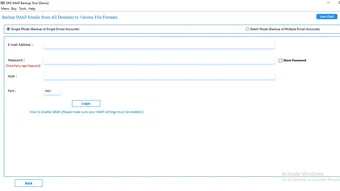
When you open the tool for the first time, a welcome screen prompts you to add an IMAP account. Enter your email address, password (or app‑specific token for services with two‑factor authentication), and the IMAP server details. The wizard verifies the connection and displays available folders. You can then select which folders to back up or choose All Folders for a full mailbox dump.
Backup Process
After selecting accounts and folders, pick your desired export format. For PST or MBOX, you may also specify a target directory for each account. Click Start Backup and watch the progress bar. The tool writes logs to %AppData%\MigrateEmails\logs for troubleshooting. Upon completion, a summary window offers quick actions: open the backup folder, export to a cloud service, or schedule the next run.
Compatibility (itemprop="operatingSystem")
MigrateEmails IMAP Backup Tool supports every modern Windows release, from Windows 7 SP1 up to Windows 11 (both Home and Pro editions). The software runs on 32‑bit and 64‑bit architectures, and it integrates smoothly with Windows Defender and other endpoint protection solutions, ensuring that the backup process does not trigger false positives.
Pros
- Easy to install and configure, even for users without IT background.
- Handles large mailboxes (tens of gigabytes) without performance degradation.
- Direct migration to major cloud providers saves time.
- Full metadata preservation guarantees a faithful copy.
- Free updates keep the tool current with evolving email standards.
Cons
- Currently Windows‑only; no native macOS, Linux, Android, or iOS client.
- Advanced scheduling requires the paid “Pro” add‑on.
- Command‑line interface is limited compared to some enterprise‑grade solutions.
Frequently Asked Questions
Is MigrateEmails IMAP Backup Tool free to use?
The core backup and export features are completely free. Optional premium modules—such as advanced scheduling and bulk license management—are offered as paid upgrades.
Can I back up encrypted or password‑protected emails?
Yes. The tool connects to the IMAP server using the credentials you provide, so any encrypted or S/MIME‑protected messages are downloaded in their original form and saved with the same encryption.
How does the tool handle large attachments?
Attachments are streamed directly to the output file, so memory consumption stays low even for multi‑gigabyte files. You can also enable an option to store attachments in a separate folder if preferred.
Is there a limit to the number of accounts I can back up at once?
No hard limit exists; the only constraints are system resources (CPU, RAM, disk space) and the rate limits imposed by your email provider.
Does the backup process run in the background?
Yes. After you start a job, the UI minimizes to the system tray, allowing you to continue working while the backup proceeds silently.
Conclusion – Secure Your Email Data Today
MigrateEmails IMAP Backup Tool delivers a powerful, secure, and user‑friendly way to safeguard and migrate your email assets. Its extensive format support, direct cloud migration, and meticulous metadata preservation make it a standout choice for anyone who values data integrity. Because the software runs locally on Windows, you retain full control over where your backups reside, eliminating the privacy concerns of third‑party cloud services. Whether you’re an IT manager orchestrating a company‑wide migration or an individual looking to archive personal correspondence, this tool provides the confidence that your messages are stored exactly as you need them. Download MigrateEmails IMAP Backup Tool now, create your first backup for free, and experience hassle‑free email migration.







